

SQL Server Express Limits in 2025: 50 GB, CPU and Memory
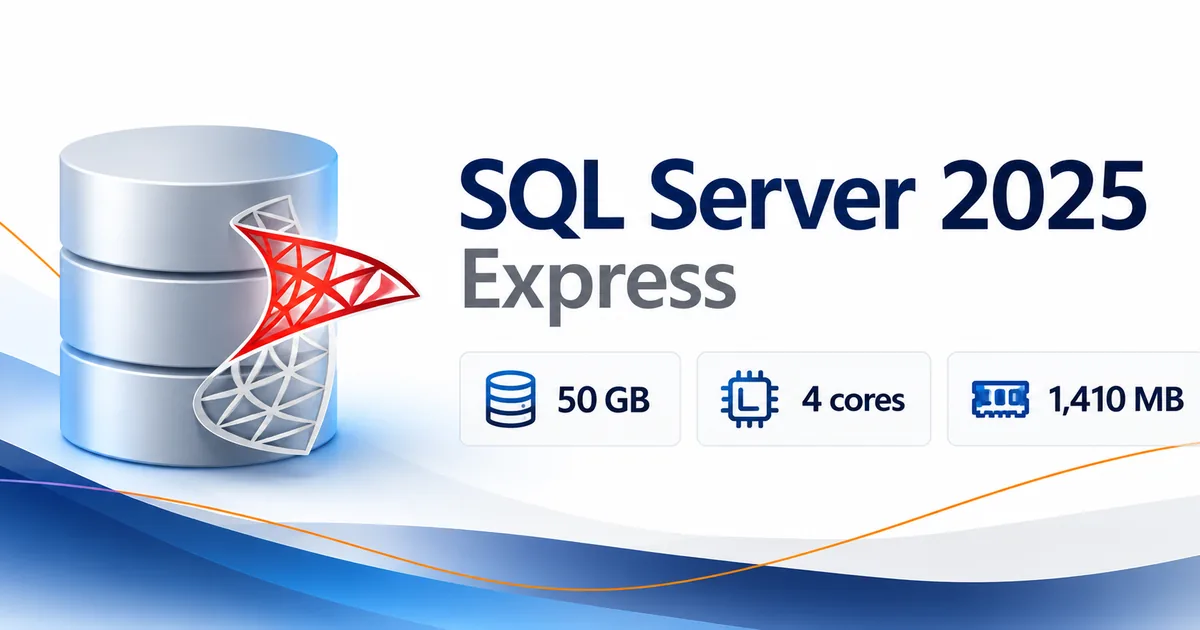
SQL Server Express limits in SQL Server 2025 come down to three numbers: a 50 GB maximum relational database size, the lesser of one processor socket or four CPU cores per instance, and a 1,410 MB buffer pool per instance. That’s a big step up from the 10 GB cap in SQL Server 2022 Express. Still, if your database keeps growing, your workload is heavy, or you need features like log shipping, SQL Server 2025 Standard may be the better fit.
This guide covers the SQL Server 2025 Express limits, what changed from SQL Server 2022, how Express compares with Standard, and when it makes sense to upgrade.
What Are the SQL Server 2025 Express Limits?
Microsoft SQL Server 2025 Express caps database size, processor use and memory. These caps apply no matter how much hardware the server has.
Here are the limits from Microsoft’s SQL Server 2025 editions and supported features documentation.
| Resource | SQL Server 2025 Express Limit |
|---|---|
| Maximum relational database size | 50 GB |
| Maximum CPU capacity | Lesser of 1 socket or 4 cores per instance |
| Database Engine buffer pool | 1,410 MB per instance |
| Columnstore segment cache | 352 MB per instance |
| Memory-optimized data | 352 MB per database |
| Log shipping | Not supported |
| SQL Server Agent | Not included |
These are edition limits, not hardware requirements. Your server can have far more RAM and CPU than Express will use.
What Is the SQL Express Database Size Limit?
In SQL Server 2025, Microsoft lists a 50 GB maximum relational database size for Express.
Whatever your databases hold, they share the instance’s CPU and memory limits.
When a database reaches 50 GB, operations that need more space can fail. If your application keeps adding records, watch the growth trend instead of waiting for storage errors.
How Much Memory Can SQL Server Express Use?
The SQL Server 2025 Express memory limit is a 1,410 MB Database Engine buffer pool per instance. The buffer pool is where SQL Server caches data pages to avoid reading the same data from storage.
That doesn’t mean the whole Express process is capped at exactly 1,410 MB. Microsoft sets separate limits for different memory areas, including:
- Columnstore segment cache: 352 MB per instance.
- Memory-optimized data: 352 MB per database.
Adding physical RAM helps the operating system and other software, but it won’t raise these Express limits.
How Many CPU Cores Does SQL Server Express Support?
SQL Server 2025 Express can use the lesser of one processor socket or four CPU cores for a single Database Engine instance.
On an eight-core processor, Express still stops at four cores, and extra sockets don’t lift the one-socket limit. This matters most for applications that run many queries at once. A database can stay well under 50 GB and still hit the Express performance ceiling.
Did SQL Server 2025 Raise the 10 GB Limit?
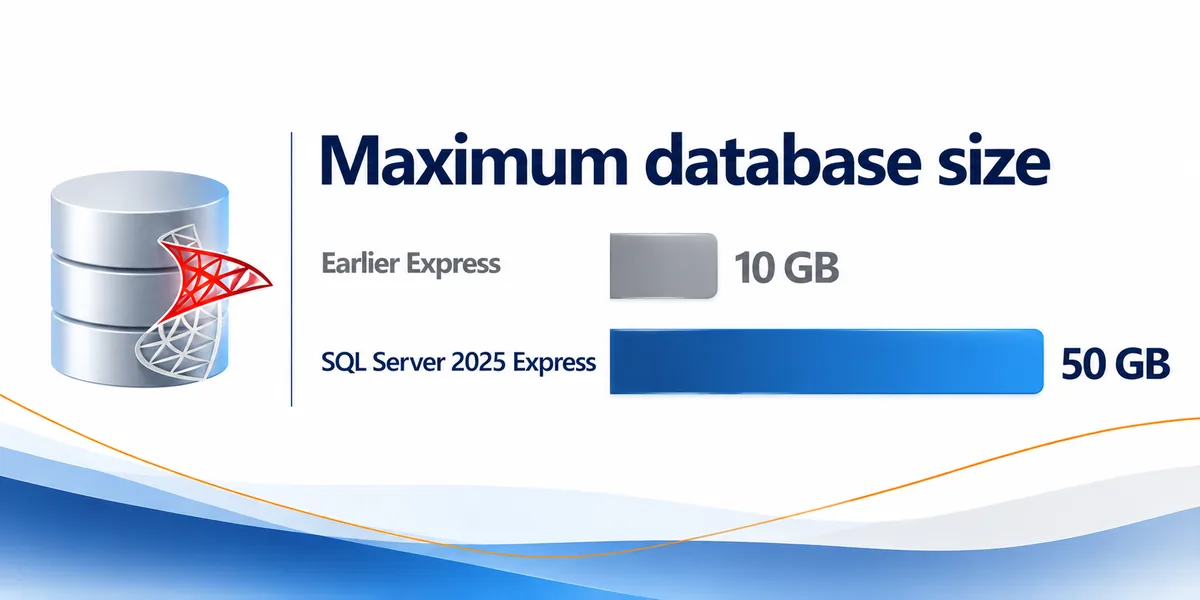
Yes. The maximum relational database size in SQL Server Express went from 10 GB in SQL Server 2022 to 50 GB in SQL Server 2025.
Microsoft lists the new 50 GB limit in its official What’s new in SQL Server 2025 documentation, and its SQL Server 2022 editions page still shows 10 GB for Express.
For anyone weighing the limitations of SQL Express, this is one of the most important changes. Older articles about the SQL Express 10GB limit still apply to SQL Server 2022 and earlier, not 2025.
Does the 50 GB Limit Apply to SQL Server 2022 Express?
No. SQL Server 2022 Express keeps its 10 GB limit. An existing 2022 Express installation won’t get the 50 GB limit until you move to SQL Server 2025. Before you upgrade, check application compatibility and Microsoft’s supported upgrade paths.
For more on older editions, read our SQL Server 2022 Express vs Developer vs Standard comparison.
Does the Larger Database Limit Eliminate the Need for Standard?
No. The bigger limit solves the storage problem, but the CPU, buffer pool and feature limits are still there.
A 15 GB database might run well on Express, while a smaller one with heavy concurrent use might struggle. Size alone can’t tell you which edition you need.
What Features Does SQL Server 2025 Express Include Now?
SQL Server 2025 Express now includes everything that used to come with SQL Server Express with Advanced Services. Microsoft discontinued the separate Advanced Services package and folded it into the regular Express edition.
According to Microsoft’s SQL Server 2025 feature documentation, Express includes:
- SQL Server Database Engine
- Full-Text Search
- SQL Server Data Tools (SSDT)
- Machine learning integration
The extra features don’t change the size, CPU or memory limits, and some tools are still left out. For example, Microsoft lists SQL Server Agent, the service that runs scheduled jobs, as available in Standard but not in Express.
Is SQL Server 2025 Express Free?
Yes. SQL Server 2025 Express is a free edition, available from the official Microsoft SQL Server 2025 Express download page.
Microsoft describes Express as the entry-level, free database, ideal for learning and building desktop and small server data-driven applications. If you need more power or a feature Express lacks, Standard is the next step.
Can You Manage SQL Server Express With SSMS?
Yes. SQL Server Management Studio (SSMS) is Microsoft’s tool for managing SQL Server, and Microsoft lists it as supported with Express. You can use it to connect to your instance, run queries, inspect databases and handle routine management tasks.
Need help getting it set up? See our guide on how to install SQL Server Management Studio.
How Does SQL Server 2025 Express Compare With Standard?
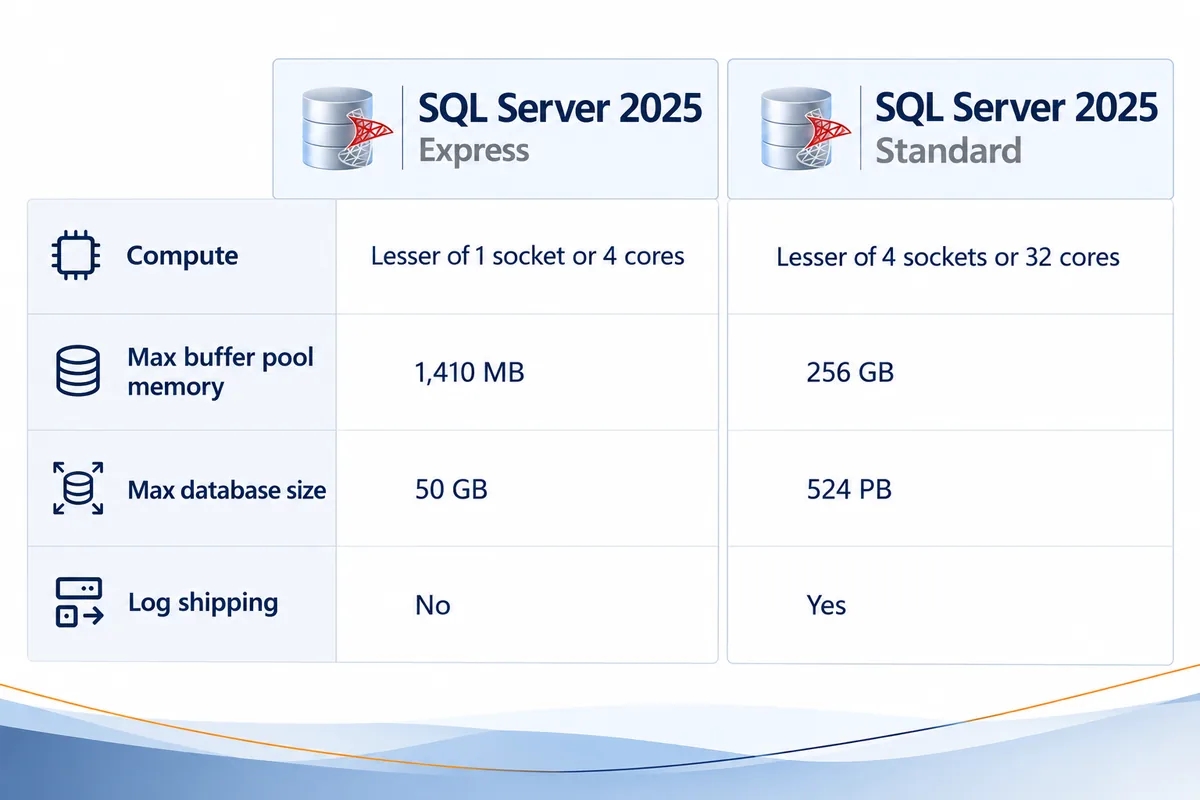
SQL Server 2025 Standard gives you much more capacity, processing power, memory and functionality. This comparison uses Microsoft’s official SQL Server 2025 edition specifications.
| Feature | SQL Server 2025 Express | SQL Server 2025 Standard |
|---|---|---|
| Relational database size | 50 GB | 524 PB |
| CPU capacity per instance | Lesser of 1 socket or 4 cores | Lesser of 4 sockets or 32 cores |
| Buffer pool memory per instance | 1,410 MB | 256 GB |
| Columnstore segment cache | 352 MB | 32 GB |
| Memory-optimized data per database | 352 MB | 32 GB |
| Log shipping | No | Yes |
| SQL Server Agent | No | Yes |
| Edition availability | Free edition | Commercially licensed edition |
For many businesses, the biggest differences are database capacity and memory. Standard’s much larger buffer pool handles more demanding workloads, and it adds log shipping and SQL Server Agent.
Which Edition Is Better for a Small Business?
Express is often a good fit when your databases are fairly small, user activity is manageable, and your applications don’t need features Express leaves out.
Standard makes more sense when your applications run important parts of the business, your data is growing quickly, or resource limits are starting to affect performance.
Base the decision on what your applications need, not on company size.
When Should You Move to SQL Server 2025 Standard?
It’s time to look at Standard when SQL Server Express limits start holding back growth, performance or features you need. These are the most common signs.
Is Your Database Approaching 50 GB?
A database nearing 50 GB is a clear reason to review your options. Look at its current size, growth rate and how long you need to keep data. Archiving old records can help, but not when your application needs that data to stay available. If growth will continue, Standard gives you much more room.
Are CPU or Memory Limits Affecting Performance?
Express can struggle with demanding workloads even when the database is well under 50 GB. Watch for consistently high resource use and slower queries at busy times.
Before you blame the SQL Express memory limit or CPU cap, check query performance and indexing, since inefficient queries cause problems on every edition. If monitoring shows the Express limits are the real bottleneck, Standard gives you more headroom.
Does Your Business Require Log Shipping?
SQL Server 2025 Express doesn’t support log shipping. SQL Server 2025 Standard does.
Log shipping uses transaction log backups to keep a secondary database up to date, which helps with availability and recovery. If your recovery plan depends on it, look at Standard.
The same goes for scheduled jobs. If you want SQL Server Agent to run backups or maintenance on a schedule, you’ll need Standard.
Are Application Requirements Changing?
Some application vendors specify SQL Server Standard for certain deployments or workload sizes. Check your vendor’s supported editions before you choose or change an installation. An upgrade can make sense even when your current size and resource use look fine.
How Do You Upgrade SQL Server Express to Standard?
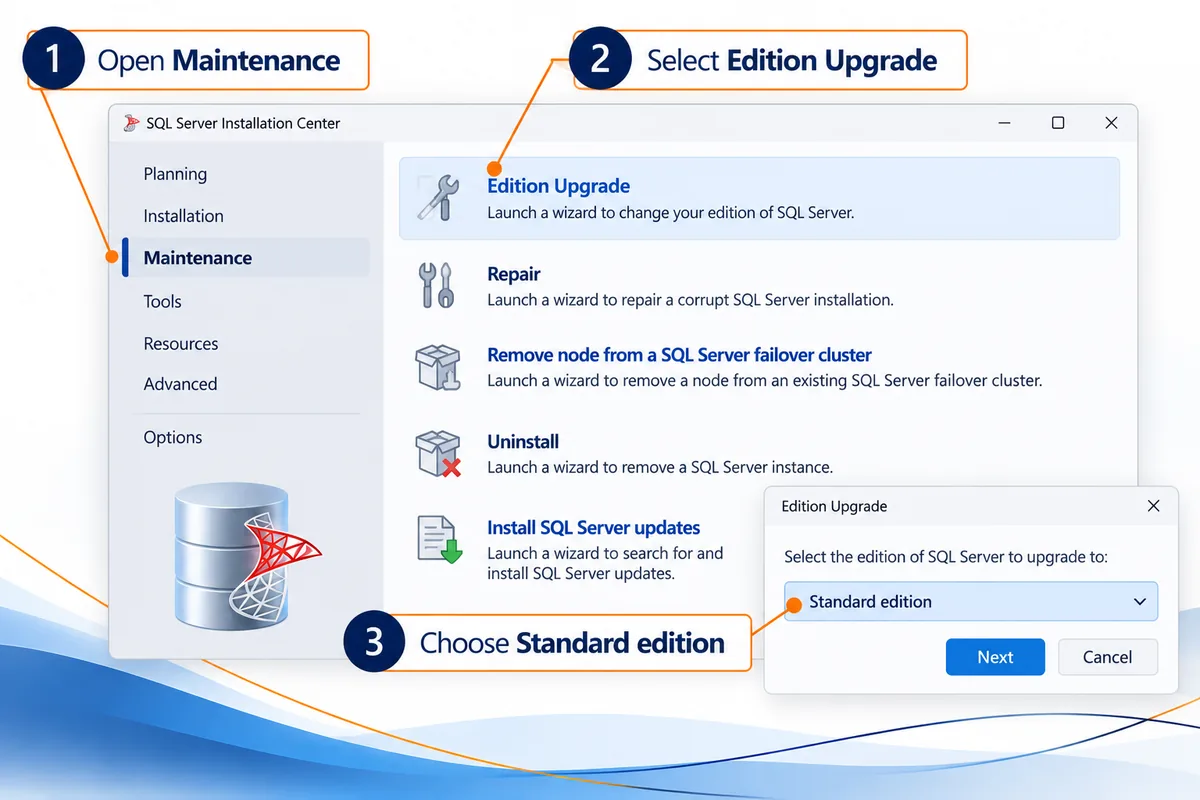
Microsoft supports upgrading SQL Server 2025 Express to SQL Server 2025 Standard, and its official SQL Server 2025 supported version and edition upgrades documentation lists this path.
For an existing SQL Server 2025 Express installation, here’s the general process. The Setup steps follow Microsoft’s Upgrade to a different edition of SQL Server (Setup) documentation:
- Review compatibility. Confirm your operating system, hardware, applications and current installation work with the edition you’re moving to.
- Back up your databases. Create and verify backups before you change anything, and have a recovery plan ready.
- Get the right Standard license. Work out the licensing your deployment needs before you start.
- Run SQL Server Setup. Microsoft’s edition-upgrade doc says to insert the SQL Server installation media and run setup.exe, or launch the SQL Server Installation Center, then select Maintenance and then Edition Upgrade. Run Setup as an administrator.
- Complete the upgrade. Per Microsoft’s steps, enter your product key on the Product Key page, accept the license terms, choose the instance on the Select Instance page and select Upgrade. Microsoft notes that Setup must restart SQL Server services to apply the new edition, which means application downtime.
- Verify the installation. Confirm the instance reports Standard edition, reconnect your applications and test important operations. Microsoft says that after upgrading from Express, you must enable the SQL Server Agent service in Windows SCM and configure its service account in SQL Server Configuration Manager.
For production systems, use a maintenance window and a tested rollback plan.
Can You Upgrade SQL Server 2022 Express Directly to SQL Server 2025 Standard?
Yes. Microsoft’s supported upgrade documentation lists SQL Server 2022 Express to SQL Server 2025 Standard as a supported path. Keep in mind that this is a version upgrade as well as an edition change. Review application compatibility, hardware and database dependencies carefully.
If you’re working with an older deployment, our SQL Server 2022 installation guide covers the earlier installation process.
Will an Edition Upgrade Preserve Existing Databases?
Microsoft’s edition-upgrade steps upgrade the existing instance you select in Setup, rather than installing a new one. An upgrade is still never a replacement for proper backups and testing.
Confirm the supported upgrade path, protect your data and test your applications first, especially if your business can’t tolerate unexpected downtime.
Why Buy From Solved IT Services?
If your business has outgrown SQL Server Express, Solved IT Services can help you get SQL Server 2025 Standard and prepare for deployment.
Reasons to choose Solved IT Services include:
- Microsoft Solutions Partner and certified reseller: We help you find the Microsoft licensing option that fits your requirements.
- More than 12 years in business: Our experience covers Microsoft software sales, licensing and customer support.
- Many industry relationships: Our relationships across the software industry help us serve a wide range of business licensing needs.
- Fast estimated delivery: Estimated delivery within 30 minutes or less from the time of purchase.
- US-based 24/7 support: Our support team is here to help with installation, activation and related questions.
We guarantee full installation and full activation of every product we sell, or your money back. See the SIS Guarantee.
Ready to move beyond SQL Server Express? Explore our options:
- Microsoft SQL Server 2025 Standard Edition License
- Microsoft SQL Server 2025 Standard Digital License
If you have multiple servers or other licensing needs, our team can help you review the options.
What Are the Most Common Questions About SQL Server Express Limits?
Microsoft lists a 50 GB maximum relational database size for SQL Server 2025 Express, up from 10 GB in SQL Server 2022 Express.
SQL Server 2025 Express has a 1,410 MB Database Engine buffer pool limit per instance. Columnstore segment cache and memory-optimized data have their own separate limits.
No. Express is limited to the lesser of one socket or four cores per Database Engine instance, even when the server has more processor capacity.
No. Microsoft’s SQL Server 2025 feature comparison shows log shipping as unavailable in Express and supported in Standard.
Yes. It’s a free edition, available from the official Microsoft Download Center, with the limits covered in this guide.
Yes. Microsoft supports this upgrade. Before you start, check application compatibility, back up your databases, get the required Standard license and follow Microsoft’s edition upgrade process.
Need SQL Server 2025 Standard for your business?
If you’re getting close to the SQL Server Express limits, explore our SQL Server 2025 Standard licenses or request a quote for your business requirements.
For licensing, installation or activation questions, email support@solveditservices.com. Our US-based support team is available 24/7.