

Visual Studio Community vs Professional in 2026: Who Must Pay?
Visual Studio Community vs Professional is mostly a licensing question, not a question of code quality. Community is free for individual developers, for classroom learning, academic research and open-source work, and for up to five users in a non-enterprise organization. In enterprise organizations, Microsoft permits no Community use beyond open source, academic research and classroom learning. Other work needs a paid edition such as Visual Studio Professional. The right choice depends on your organization’s size, the kind of work you do, and how many people will use it.
Who can use Visual Studio Community for free?
Microsoft calls Visual Studio Community a free, fully featured integrated development environment (IDE). It covers coding, debugging, Git, extensions and a wide range of app types. Free doesn’t mean every business can use it for anything, though.
Can individual developers use Community for paid applications?
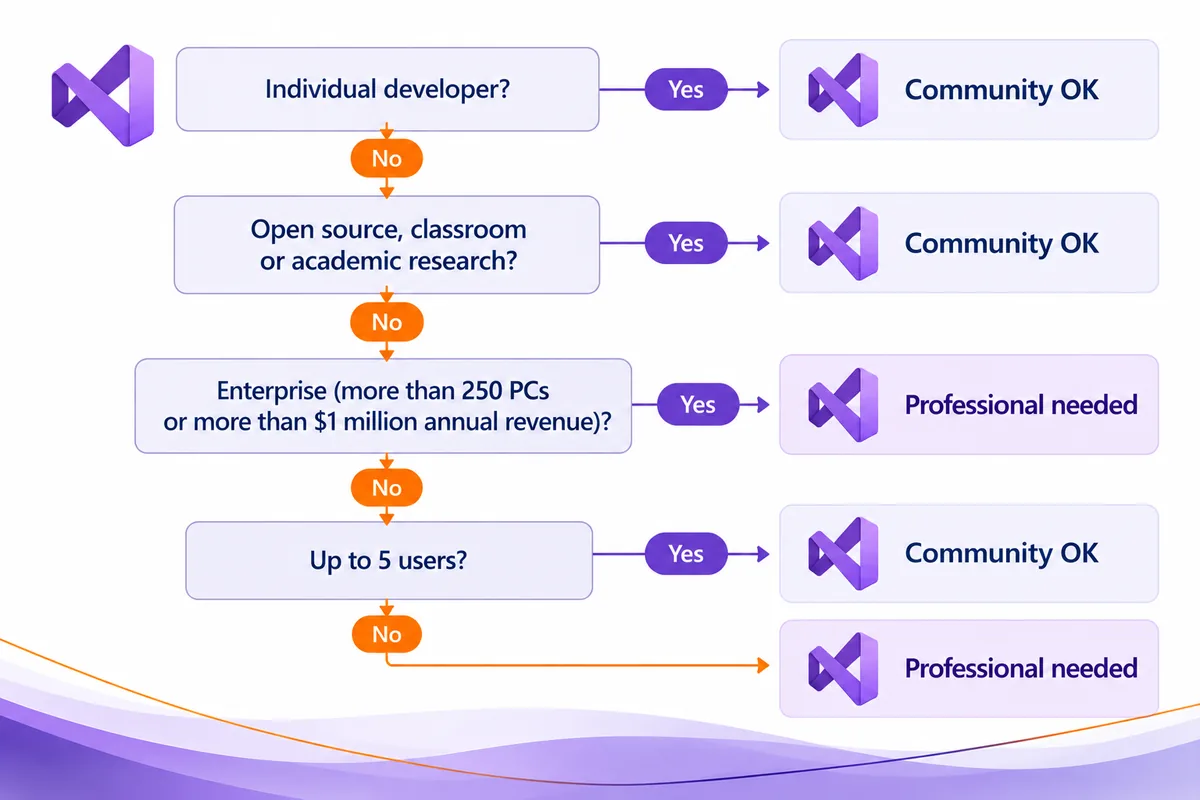
Yes. Microsoft’s Community page says any individual developer can use it to create their own free or paid apps. If you’re building your own project, you don’t need Professional because the finished app might make money.
The line to watch is between an individual working on their own apps and people using Community inside an organization. Organizations have separate limits. If you’re writing code for a company, check the company’s eligibility, not only the individual-developer rule.
Can schools, researchers, and open-source teams use Community?
Yes. Microsoft allows an unlimited number of users in an organization to use Community for classroom learning, academic research, or contributing to open-source projects. These are specific purposes. They aren’t a blanket pass for everything a school or large organization does.
For example, classroom teaching can qualify even at an institution with many computers. Other work at the same institution still has to meet the general organizational rules.
Can a small company use Community for commercial development?
Yes, within Microsoft’s limits. In a non-enterprise organization, up to five users can use Community for other development work, including everyday business projects.
A non-enterprise business with four people using Community for its software projects is within the five-user allowance. If it adds a sixth Community user for the same kind of work, the company is over the limit. Check the Microsoft Community usage rules before you assign editions to employees.
What counts as an enterprise under Microsoft’s Community rules?
Microsoft’s Community page words it this way: enterprise organizations (meaning those with >250 PCs or >$1 Million US Dollars in annual revenue). The dollar figure is part of Microsoft’s business-size definition. It isn’t a software price.
This matters because the test isn’t only about how many developers you have. A company with three developers can still be an enterprise if its annual revenue is over the threshold. A company with lots of PCs can be an enterprise even with a small development team.
In an enterprise, Microsoft’s Community page says no use is permitted beyond the open source, academic research and classroom learning scenarios. An enterprise building a private customer app should plan on properly licensed Professional or Enterprise users.
Don’t assume a small development department automatically qualifies for Community. Check the organization-wide criteria first, then the project. The Microsoft editions comparison shows the supported usage scenarios for Community, Professional and Enterprise.
Visual Studio Community vs Professional in 2026: How do they compare?
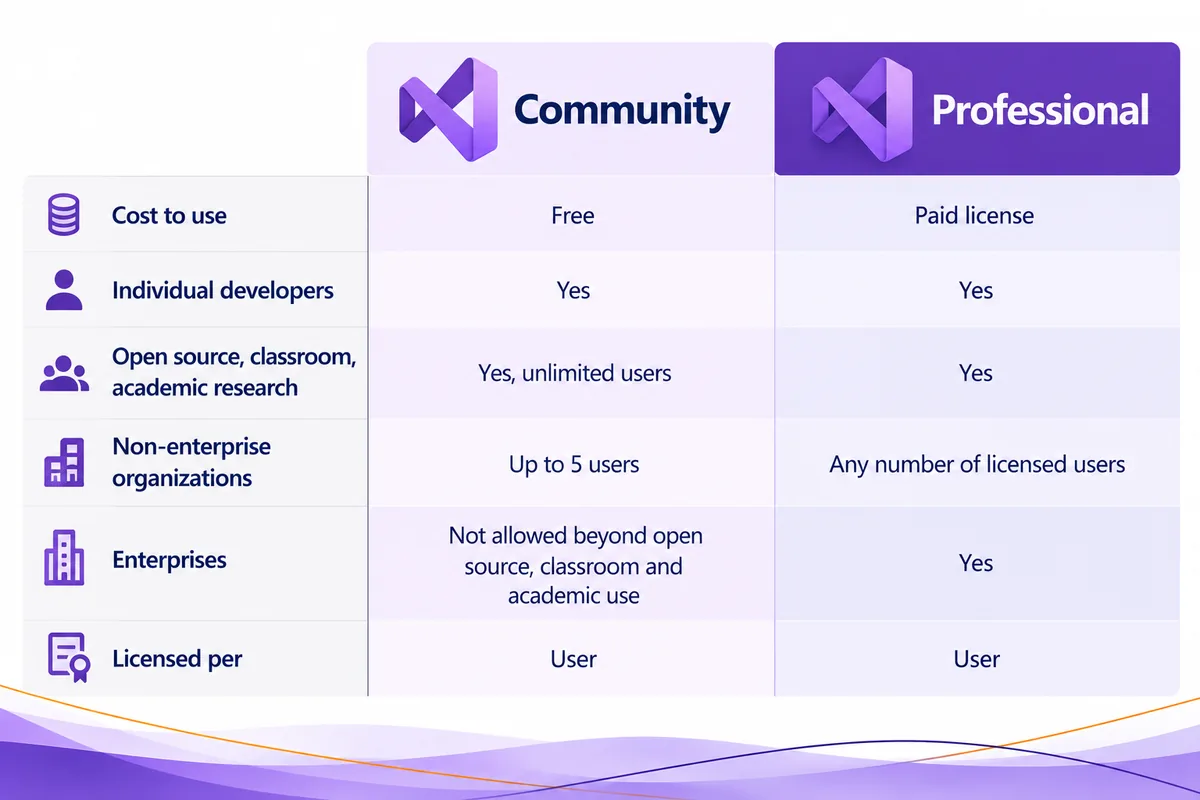
Both editions belong to Microsoft’s Visual Studio IDE family. For many buyers, the biggest difference is who may use each edition for business development. Professional is the licensed option for developers whose work falls outside Community’s permitted scenarios.
| Question or use case | Visual Studio Community | Visual Studio Professional |
|---|---|---|
| Can you use it without buying anything? | Yes, for eligible users and scenarios | No, each user needs a Professional license or subscription |
| Can an individual create free or paid apps? | Yes, under the individual-use allowance | Yes, with a valid user license |
| Can an organization use it for classroom learning, academic research, or open source? | Yes, with no five-user cap for those scenarios | Yes, with a license for each user |
| Can a non-enterprise company use it for everyday development? | Yes, up to five Community users | Yes, with a license for each user |
| Can an enterprise use it for everyday commercial development? | No, beyond open source, academic research and classroom learning | Yes, with a license for each user |
| How is it licensed? | Free under Microsoft’s Community usage terms | Per user, not per device |
| Does it include coding and debugging tools? | Yes | Yes |
Microsoft keeps an official Community, Professional, and Enterprise comparison for detailed features. The table above sticks to the licensing questions that usually decide whether a developer can stay on Community.
Is Visual Studio Professional licensed per user or per device?
Visual Studio Professional is licensed per user, not per installation. Microsoft’s Visual Studio licensing guidance says each licensed user may install and use the software on any number of devices to design, develop, test and demonstrate their programs.
Say a developer works on an office desktop and a laptop at home. That one licensed person can install and use Visual Studio on both. The business doesn’t count each installation as a separate Professional user.
It doesn’t work the other way around. If two developers share one computer, a single installation doesn’t stretch one user license to cover both of them. Microsoft says every person who uses the software needs a valid license.
Does a Professional license cover an entire development team?
No. A standalone Visual Studio Professional license isn’t a department-wide license. Count the people who will use Professional, not the machines it’s installed on. For a team of six Professional users, plan for six user licenses, not one license on a shared workstation.
Community’s published rule is also stated in users: up to five users in a non-enterprise organization. Professional’s licensing guidance covers each individual licensed user.
What does Visual Studio Professional add over Community?
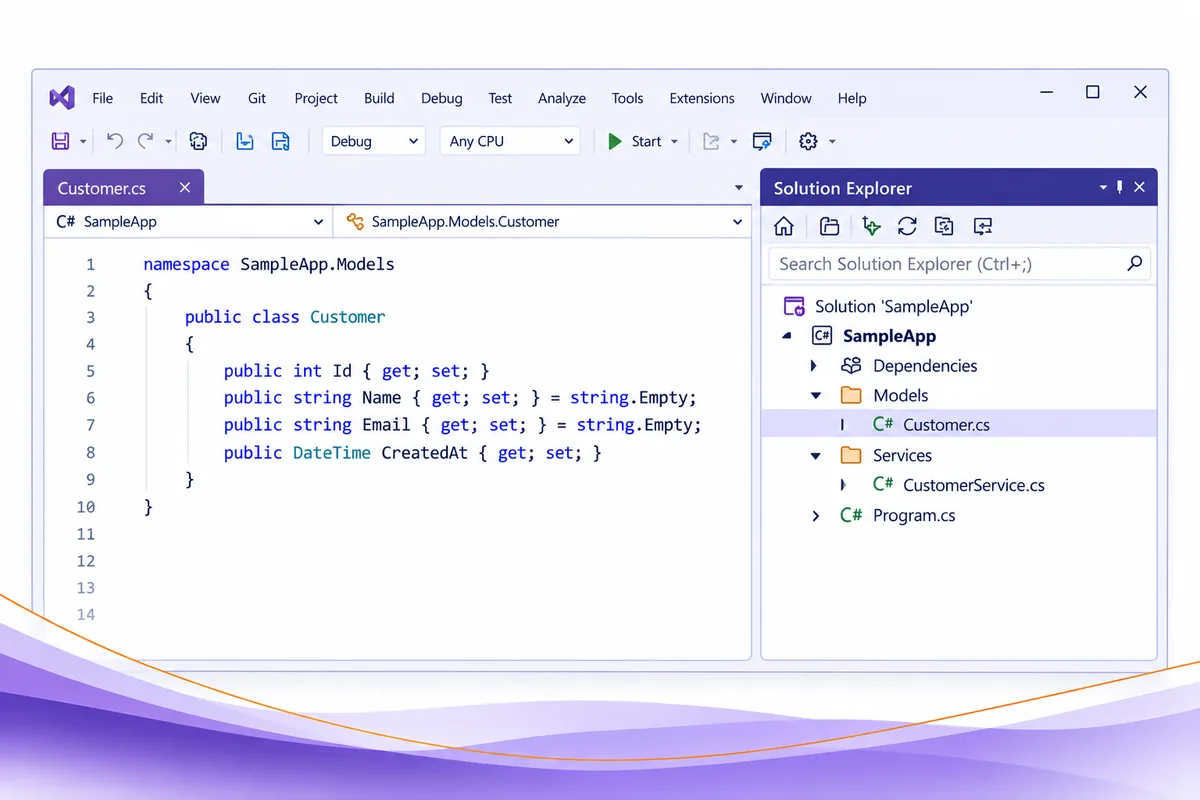
Visual Studio Community already includes serious development tools. Microsoft’s Community product page lists designers, editors, debuggers and profilers in one tool, plus built-in Git and access to thousands of extensions. A free IDE isn’t only for practice projects.
Professional’s first practical advantage is that it licenses development work Community doesn’t cover. For a growing company, that can matter more than any single editor feature.
Microsoft describes Visual Studio Professional as “powerful developer tools, services, and subscription benefits for efficient small-team collaboration.” Use the official editions comparison to check tools and features against Community and Enterprise before you buy. Confirm that a feature is in the edition you plan to use instead of assuming every higher-tier capability comes with it.
Is Visual Studio Professional a subscription or a perpetual license?
It can be either, and the two aren’t interchangeable. Microsoft’s licensing guidance covers standalone Visual Studio Professional licenses with perpetual use rights. Professional is also offered through Visual Studio subscriptions.
If you want a Visual Studio Professional perpetual license, make sure the product is the standalone license and not a subscription. Microsoft’s Professional purchasing FAQ explains the channels Microsoft sells it through. Check the product description and license type before you order.
What about Visual Studio Community vs Enterprise?
Enterprise is another paid Visual Studio edition with a different feature set. Microsoft’s Visual Studio licensing whitepaper says Visual Studio Enterprise is available only as part of the Visual Studio Subscription. You don’t have to choose Enterprise because your organization is over the Community threshold. Professional can be the right licensed IDE if its tools cover what your team needs.
For a broader Visual Studio Community vs Professional vs Enterprise decision, use Microsoft’s edition comparison and ask two separate questions: which edition is your organization allowed to use, and which tools does your team actually need?
When do you have to move from Community to Professional?
Move a user off Community when their work no longer fits Microsoft’s Community allowance. There are three common triggers.
First, the organization grows past five Community users. In a non-enterprise organization doing everyday commercial development, Community covers up to five users. If a sixth person needs the IDE, they can’t be added as a sixth Community user under the published limit. That developer needs a paid license, such as Professional.
Second, the organization crosses an enterprise threshold. More than 250 PCs or more than $1 million USD in annual revenue changes the picture. For everyday commercial development, Community is no longer an option, even if fewer than five developers use it.
Third, the project isn’t open source, academic research or classroom learning. Those three scenarios have their own allowance. A commercial or internal proprietary project has to meet the general organizational rules.
How can you check your team’s eligibility before purchasing?
Here’s some plain guidance, not an official Microsoft procedure. Start with the organization: is it an enterprise under Microsoft’s definition above? Then look at the work, and separate open source, academic research and classroom learning from everyday business development. For non-enterprise business use, count the people who use Community against the five-user limit. Anyone who needs Professional needs their own license.
Microsoft’s Visual Studio Community 2026 license terms and Visual Studio licensing guidance are the final word Read them before you decide.
What should you check before downloading Visual Studio Professional 2026?
Confirm the edition, the user and the license type before you get the Visual Studio Professional download. Microsoft’s Visual Studio 2026 release notes cover the current release, and the Visual Studio 2026 lifecycle page lists Community, Professional and Enterprise among its editions.
To buy from us, see Microsoft Visual Studio 2026 Professional License. If you prefer the digital product listing, see Microsoft Visual Studio 2026 Professional Digital License.
Developers who also need a Windows workstation license can look at the Microsoft Windows 11 Pro + Visual Studio Professional 2026 Developer Workstation Bundle | 1 PC. Check exactly which products are included and that each user has the right license before you order.
If you’re comparing Visual Studio Professional vs Code, treat them as separate products. Visual Studio Code is a separate code editor. It isn’t another name for the Professional edition of the Visual Studio IDE. Think about the apps you build and how you like to work before you choose.
Why buy from Solved IT Services?
Solved IT Services helps individuals and businesses buy Microsoft development software, with clear product options and help when you need it.
- Microsoft Solutions Partner and certified reseller: You’re buying from a business focused on Microsoft software.
- More than 12 years in business: We’ve spent that time helping customers with software purchases and licensing questions.
- Many industry relationships: Our relationships across the software industry help us find the right products for our customers.
- Fast estimated delivery: Estimated delivery within 30 minutes or less from the time of purchase.
- US-based 24/7 support: Reach our support team for help with your purchase and installation.
We guarantee full installation and full activation of every product we sell, or your money back. See the SIS Guarantee.
If your team is deciding between Community and Professional, use the eligibility checks above to see whether you need a paid edition. We can help you pick the right Visual Studio Professional product for your team.
What are the most common questions about Visual Studio Community vs Professional?
Yes. Microsoft’s Community rules let individual developers create their own paid apps. Developers working inside an organization still have to meet that organization’s usage limits.
Not for everyday business development. A non-enterprise organization can have up to five Community users for that kind of work. A sixth developer would need a licensed edition such as Professional instead of becoming a sixth Community user.
Yes. Microsoft’s Community page allows unlimited users in an organization for contributing to open source projects, classroom learning and academic research. That allowance doesn’t carry over to an enterprise’s separate proprietary development.
Yes, as long as the same licensed person is using them, in line with Microsoft’s terms. Visual Studio Professional is licensed per user, not per device. Other developers need their own licenses. See Microsoft’s licensing guidance.
Yes. Microsoft’s licensing guidance covers standalone Visual Studio Professional licenses with perpetual use rights. Before you buy, check whether a listing is a standalone perpetual license or a subscription, because what’s included is different.
They’re different versions of the Community product, and Microsoft publishes separate license terms for each. If you use Visual Studio 2022 Community today, don’t assume its documentation sets the exact terms for Visual Studio 2026 Community. Check the official Visual Studio license directory and the 2026 Community license terms for the version you install.
No. The Visual Studio Professional edition is part of the Visual Studio IDE family. Visual Studio Code is a separate code editor. Pick the environment your projects need, then check the licensing terms for the product you’ll use.
Need Visual Studio Professional 2026 for your business?
See the Microsoft Visual Studio 2026 Professional License or request a quote for help choosing the right product for your team.