

Microsoft Publisher Alternative: What to Use in 2026
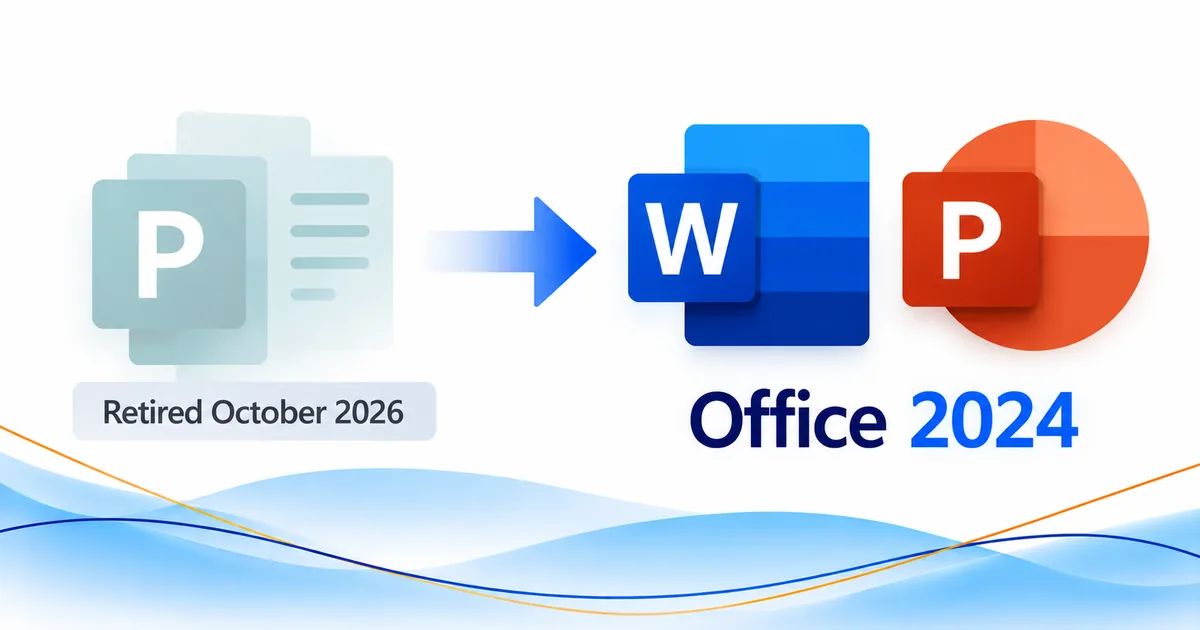
Microsoft Publisher was retired in October 2026, and it isn’t part of Office 2024. If you’re looking for a Microsoft Publisher alternative, Microsoft’s own advice is to use Word and PowerPoint. Word suits text-heavy jobs like newsletters and forms, and PowerPoint suits visual ones like posters and signs. Both apps come with every Office 2024 edition covered below.
That means you can keep making flyers, brochures, business cards, labels, newsletters, posters, and more without Publisher. Which app you pick depends on the project, and on whether you have old .pub files you want to keep.
Is Microsoft Publisher being retired?
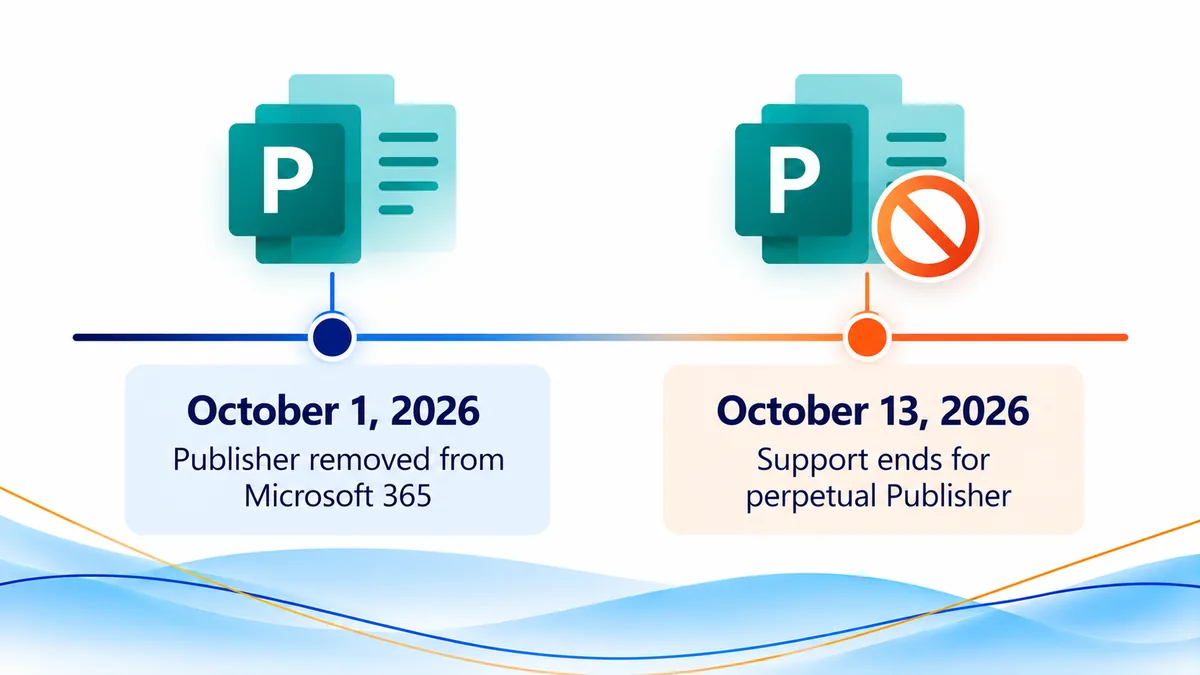
Yes, and it has already happened. The Microsoft Publisher retirement took place in October 2026. Microsoft said Publisher would reach the end of its life that month and would no longer be included in Microsoft 365. What that means for you depends on whether you had Publisher through a Microsoft 365 subscription or own a perpetual (one-time purchase) copy.
Here are the key dates from Microsoft’s official Publisher retirement guidance:
- October 1, 2026: Microsoft said you could keep using Publisher with its current functionality until this date.
- On or shortly after October 1, 2026: Microsoft 365 subscribers lost access to Publisher as Microsoft rolled out the removal update. Subscribers can no longer open or edit
.pubfiles in Publisher. - October 13, 2026: Support for the perpetual version of Publisher ended.
The big difference is between losing access through a subscription and owning a perpetual copy you can still run. For new work, Microsoft recommends Word or PowerPoint. For existing .pub files, save a usable copy before you start redesigning anything.
Is Publisher included in Office 2024?
No. Publisher is not included in Office 2024. Buying an Office 2024 edition won’t put Publisher on your computer, and none of the editions includes it under another name.
Microsoft says clearly that Publisher isn’t included with Office LTSC 2024, in both its Office LTSC 2024 overview and its Office 2024 and Office LTSC 2024 FAQ. Microsoft ties that change to Publisher’s planned retirement. Its app lists for Office Home 2024 and Office Home & Business 2024 don’t include Publisher either.
If you search for Publisher 2024 or Microsoft Office with Publisher one time purchase, read the product description carefully. Office 2024 gives you Word and PowerPoint. It doesn’t include a new edition of Publisher.
If you’d rather buy Office once than pay for a Microsoft 365 subscription, Office 2024 is still a practical way to get the apps Microsoft recommends. The question to ask isn’t which Office edition has Publisher. It’s which edition has the apps you need for your work.
What is the best Microsoft Publisher alternative?
For most everyday Publisher projects, the best alternative to Microsoft Publisher is Microsoft Word or Microsoft PowerPoint. That’s Microsoft’s own recommendation. It doesn’t mean either app copies every Publisher feature.
Pick Word when the publication is mostly text, regular pages, forms, or printed office stationery. Pick PowerPoint when the design depends on placing visual elements freely around the page, like banners, signs, and posters.
When should you use Microsoft Word instead of Publisher?
Word is a strong publisher replacement for things people need to read, fill in, print, or update often. Microsoft specifically points to Word for envelopes, labels, letterhead, newsletters, programs, invoices, applications, and forms.
Say your business used to make its newsletter in Publisher. You can build the next issue in Word. The same goes for letterhead, forms, and mailing labels.
Microsoft also lists Word as an option for flyers, brochures, certificates, business cards, calendars, and greeting cards. It’s especially handy when your team already shares and edits Word documents and wants to stay with file types everyone knows.
When should you use Microsoft PowerPoint instead of Publisher?
PowerPoint is Microsoft’s recommended starting point for banners, signs, and posters. Microsoft also lists it as an option for ads, flyers, brochures, certificates, business cards, calendars, and cards.
PowerPoint’s slide canvas works well for arranging images, shapes, and text wherever you want them. If you need a poster or a promo flyer, you can design it there without Publisher.
Before you print, check the page size, layout, and print settings. A PowerPoint file isn’t the same as a Publisher file, even when the printed piece does the same job.
How do you decide between Word and PowerPoint?
Start with the type of project instead of hunting for a perfect Microsoft Publisher equivalent. If the document has paragraphs, tables, forms, or formatting you reuse, start in Word. If it’s mostly visual and you need to arrange things freely, start in PowerPoint.
For a brochure or flyer, either app can work. Choose the one that will be easier for whoever updates the file next time.
Which app replaces each Publisher job?
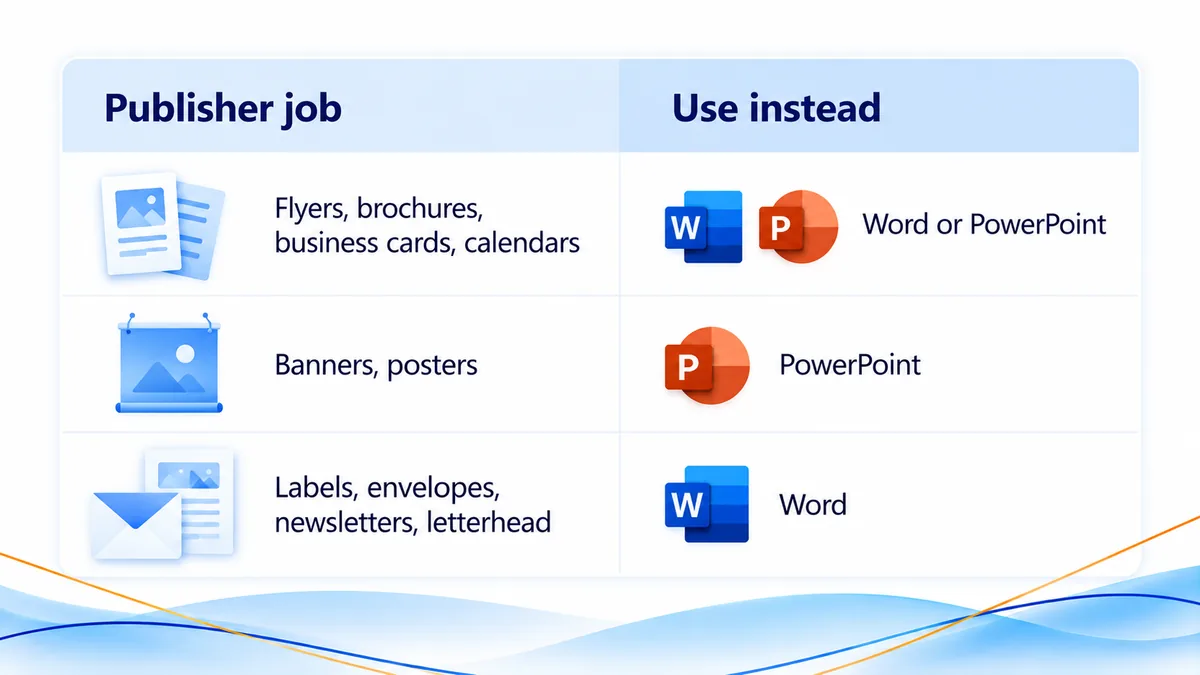
Microsoft gives specific recommendations for common publishing jobs. This table follows the recommended alternatives listed by Microsoft.
| What you want to create | Microsoft’s recommended app |
|---|---|
| Ads or flyers | Word or PowerPoint |
| Brochures | Word or PowerPoint |
| Banners, signs, or posters | PowerPoint |
| Certificates | Word or PowerPoint |
| Business cards | Word or PowerPoint |
| Business invoices, applications, or forms | Word |
| Calendars | Word or PowerPoint |
| Envelopes | Word |
| Labels | Word |
| Letterhead | Word |
| Newsletters | Word |
| Programs or folded-paper projects | Word |
| Greeting cards or other cards | Word or PowerPoint |
If you do a mix of work, you may want both apps: Word for invoices and labels, PowerPoint for posters, and either one for brochures.
Keep in mind that picking an app doesn’t turn your old Publisher documents into editable new files. Existing .pub projects need a separate conversion step.
How do you convert Publisher files to PDF or Word?
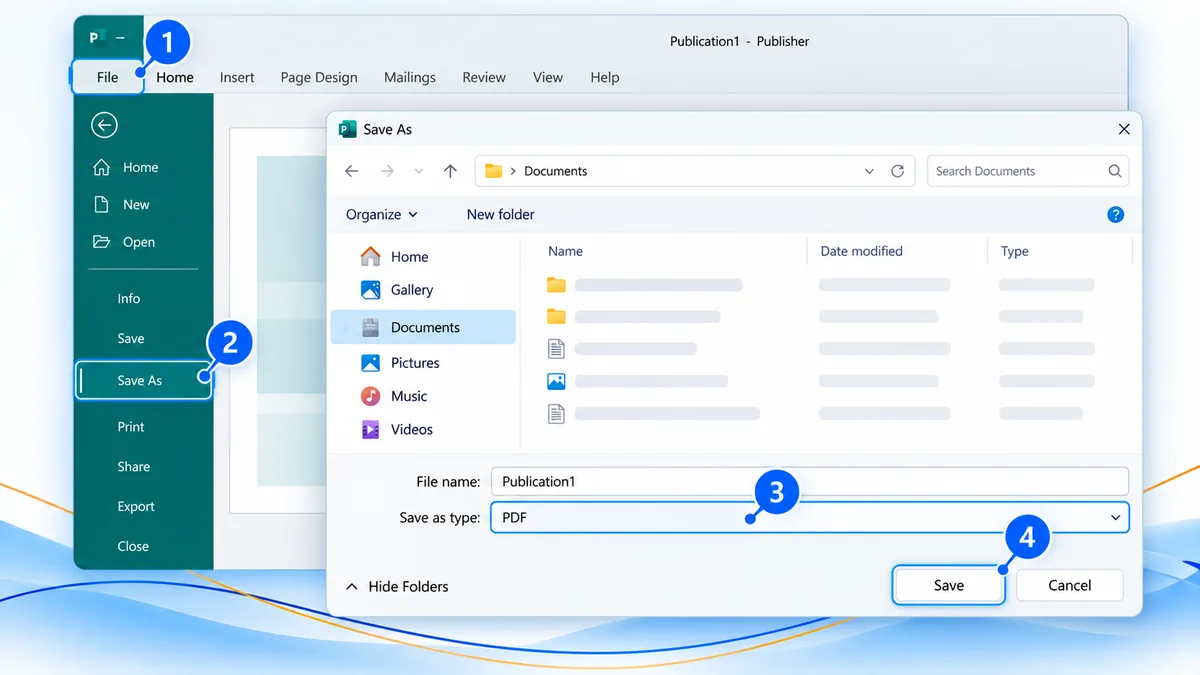
Microsoft recommends converting existing Publisher files to PDF so you can view them, then converting those PDFs to Word if you need to edit the text. You’ll need a working copy of Publisher to start. Microsoft lists the steps in its Publisher file-conversion instructions.
How do you save a Publisher file as a PDF?
If you still have a working Publisher installation that can open the file:
- Open the
.pubfile in Publisher. - Select File > Save as.
- Choose where you want to save the file.
- Select PDF as the file type, then select Save.
- Open the new PDF and check that the pages, images, and text look the way you expect.
The PDF gives you a copy you can view and share. Keep the original .pub file too, in case you want to come back to the design later.
How do you turn the PDF into an editable Word file?
If you need to change the text, not only view it, Microsoft recommends these extra steps:
- Open Microsoft Word.
- Select File > Open.
- Find and open the PDF you saved from Publisher.
- Select OK in the dialog box that appears.
- Review the new Word document before you edit or share it.
Important: Microsoft notes that the converted Word document is optimized for text editing. Its layout may differ from the original PDF, especially if the publication has a lot of graphics. Check headings, images, columns, spacing, and page breaks before you treat the converted file as the final version.
For heavily designed pieces, it’s often easier to keep the original as a PDF and build the next edition in Word or PowerPoint. That way you aren’t counting on every part of a complex Publisher layout making it through the conversion unchanged.
What if you have hundreds of Publisher files?
Start by finding the originals. Microsoft suggests searching for .pub on your PC, OneDrive, or SharePoint. Then sort what you find by how you’ll use it: finished pieces you only need to view, active documents that need new text, and designs worth rebuilding.
Microsoft also shares a PowerShell sample for converting Publisher files in bulk. It can save time with a large collection, but it needs a working, licensed copy of Publisher, and Microsoft recommends adjusting and testing it for your own setup. Read Microsoft’s bulk-conversion guidance before you run a script on business files.
Can you still use Publisher after it retires?
Yes, in one case. Microsoft says that if you have a perpetual version of Publisher, you can still install and use it after support ends. As covered above, support for the perpetual version of Publisher ended on October 13, 2026.
It’s a different story for Microsoft 365 Publisher users. Microsoft says subscribers lost access on or shortly after October 1, 2026, as the removal update rolled out. If that’s you, don’t count on your subscription to keep opening or editing Publisher files.
If you’re wondering whether to buy Microsoft Publisher, keep two things separate: a perpetual copy you already have installed, and a new Office 2024 purchase. Office 2024 doesn’t include Publisher. For new work, Microsoft points you to Word and PowerPoint, not another edition of Publisher.
Even if your perpetual copy still works, think about how coworkers and future computers will get to those files. Save PDFs of your finished publications and start new projects in Word or PowerPoint.
Which Office 2024 edition should you get?
Every Office 2024 edition below includes Word and PowerPoint, the two apps Microsoft recommends for common Publisher jobs. Choose based on your operating system and the other Office apps you need, not on finding Publisher in the bundle.
- Microsoft Office Home 2024 – Windows/Mac: A good fit for students and families who need Word and PowerPoint on Windows or Mac.
- Microsoft Office Home & Business 2024 License – Windows/Mac: A practical choice for business users who want Word and PowerPoint plus Outlook, on Windows or Mac.
- Microsoft Office 2024 Standard License for Windows PC: A Windows PC option if you need a broader Office suite for work.
- Microsoft Office 2024 Professional Plus License: An option for Windows-based professional work that calls for additional Office apps.
If you mainly want a Publisher alternative for Windows, any edition with Word and PowerPoint gives you Microsoft’s recommended starting point. You don’t need the biggest suite to design a flyer or a poster.
For a closer look, read our Office 2024 Home vs. Home & Business vs. Professional Plus comparison. If you need one app instead of a whole suite, see our guide to standalone Office 2024 apps.
Before you buy, check which operating systems the edition supports and which apps it includes. Moving off Publisher goes more smoothly when the new Office license fits the computer and the people who will use it.
Why buy from Solved IT Services?
Solved IT Services helps customers choose the right Microsoft software for the work they do, including moving from Publisher to Word or PowerPoint. When you buy an Office 2024 edition from us, here’s what you can expect:
- Microsoft Solutions Partner and certified reseller: You’re working with a business focused on Microsoft software and licensing.
- More than 12 years in business: Years of experience helping customers get the right software and put it to work.
- Many industry relationships: Connections across the software industry that back up our product knowledge and customer service.
- Fast estimated delivery: Estimated delivery within 30 minutes or less from the time of purchase.
- US-based 24/7 support: Help with product questions, installation, and activation, any time you need it.
We guarantee full installation and full activation of every product we sell, or your money back. See the SIS Guarantee.
Not sure which Office 2024 edition fits your Publisher replacement project? Contact our team before you order. We’ll help you find the right apps, and we’ll be upfront that no Office 2024 edition includes Publisher.
What questions are frequently asked about Microsoft Publisher alternatives?
Microsoft recommends Word and PowerPoint for common Publisher jobs. Word is the better place to start for newsletters, labels, letterhead, invoices, and forms. PowerPoint is Microsoft’s pick for banners, signs, and posters. For flyers, brochures, business cards, and calendars, Microsoft lists either app.
No. Publisher is not included in Office 2024. Microsoft says clearly that it’s left out of Office LTSC 2024. Office 2024 editions give you Word and PowerPoint for the common publishing jobs Microsoft lists.
Microsoft’s guidance doesn’t describe opening a .pub file directly in Word. Its recommended path is to open the original file in Publisher, save it as a PDF, and then open that PDF in Word to convert it. Check the converted document closely, because the layout may change, especially around graphics.
Microsoft says Microsoft 365 subscribers lost access to Publisher on or shortly after October 1, 2026, as the removal update rolled out. If you’re a subscriber, use Word or PowerPoint for new publications, and work from PDF or Word versions of your older Publisher documents.
Yes. Microsoft says you can still install and use a perpetual copy of Publisher after support ends. Support for the perpetual version of Publisher ended on October 13, 2026. Office 2024 doesn’t include Publisher.
Microsoft’s retirement guidance names Word and PowerPoint as the alternatives. Both come with the Office 2024 editions covered here, which you buy once instead of paying for a subscription. The guidance doesn’t offer a new free edition of Publisher as a replacement. Microsoft also offers free web versions of Word and PowerPoint that you can use in a browser with a Microsoft account.
Ready to replace Publisher with Office 2024?
For new brochures, labels, newsletters, signs, and other projects, start in Word or PowerPoint, following Microsoft’s recommendations. If you still have a working copy of Publisher, save your important .pub files as PDFs. Then pick the Office 2024 edition that fits your operating system and the apps you need.
Browse the Office 2024 products linked above, email support@solveditservices.com, or request a quote for help choosing the right Microsoft software.