

Office 2024 Standard for Mac vs Office Home & Business 2024 for Mac: What Is Different?
Office 2024 Standard for Mac is a volume-licensed edition of Microsoft Office for organizations. Office Home & Business 2024 for Mac is a one-time-purchase edition for individuals, families and small businesses. Both come with the classic Word, Excel, PowerPoint and Outlook apps, and Home & Business 2024 also includes OneNote. If you’re buying Microsoft Office for one Mac, Office Home & Business 2024 is usually the easier pick.
The real difference isn’t the apps you use every day. It’s how Microsoft licenses, distributes and activates each edition.
Once you know how they differ, it’s easier to choose the right Microsoft Office suite for Mac and avoid buying an edition that doesn’t match how you’ll use it.
What is Office 2024 Standard for Mac?
Office 2024 Standard for Mac is Microsoft’s volume-licensed productivity suite for organizations that buy and manage software through a licensing agreement.
Its official name is Office LTSC Standard for Mac 2024. It belongs to the Office Long Term Servicing Channel (LTSC) family, which keeps a fixed set of features instead of adding new ones over time the way a Microsoft 365 subscription does.
Microsoft’s official Office volume licensing comparison describes the Mac edition as classic 2024 versions of:
- Microsoft Word
- Microsoft Excel
- Microsoft PowerPoint
- Microsoft Outlook
Microsoft describes the edition as installed on one Mac, with administrator volume activation. Setup and activation work differently from the retail editions people buy for home or a small office.
Who is Office 2024 Standard for Mac designed for?
It’s built for organizations that already use Microsoft volume licensing to buy, manage and deploy software.
For example, a company’s IT team might install the same Office edition on every company-owned Mac. Volume licensing lets administrators manage those installs under one organizational agreement.
Microsoft’s Office LTSC 2024 overview says the Mac edition is available to volume-licensed customers.
Microsoft gives Office LTSC 2024 five years of Mainstream Support and no Extended Support. It doesn’t get new features after launch, and the feature set stays the same.
Office 2024 Standard for Mac isn’t a consumer retail edition, and Solved IT Services does not sell it.
What is Office Home & Business 2024 for Mac?
Office Home & Business 2024 for Mac is Microsoft’s one-time-purchase Office edition with classic apps and email. Microsoft describes it as an edition for families and small businesses, and it works well for individual professionals too.
It includes classic desktop versions of:
Word for Mac: Write and edit documents, letters, reports and proposals.
Excel for Mac: Build spreadsheets, work with formulas and keep track of financial records and business data.
PowerPoint for Mac: Put together presentations, training materials and visual reports.
Outlook for Mac: Manage your email, calendar, contacts and appointments.
OneNote for Mac: Keep notes, research, meeting details and other reference material in one place.
Microsoft lists these apps in its Office 2024 and Office LTSC 2024 FAQ.
Is Office Home & Business 2024 for Mac a one-time purchase?
Yes. You buy Office Home & Business 2024 for Mac once, and you don’t need an ongoing Microsoft 365 subscription to use the included desktop apps.
It’s a one-time purchase for one Mac.
It also comes with commercial-use rights, which means you can use it for work and business.
For example, a small business owner who builds invoices in Excel, writes client proposals in Word and handles business email in Outlook can do all of that with Office Home & Business 2024.
Microsoft’s Office 2024 consumer announcement says this edition comes with the rights to use the apps for commercial purposes.
If you’re looking for a Microsoft Office for Mac one-time purchase, you can view Microsoft Office Home & Business 2024 for Mac | Lifetime License for 1 Mac at Solved IT Services.
How does Office 2024 Standard for Mac compare with Home & Business 2024?
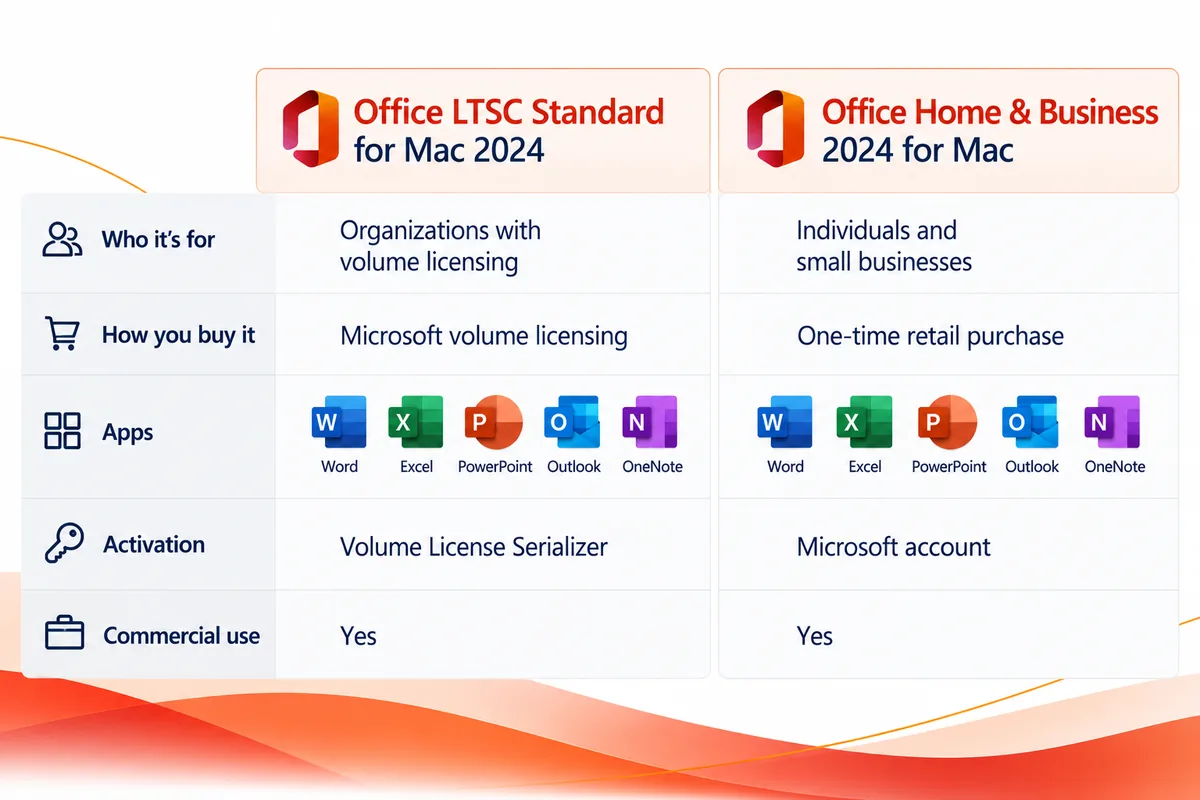
Here’s how Office 2024 Standard for Mac vs Home and Business 2024 compare on the points that matter most.
| Feature | Office 2024 Standard for Mac | Office Home & Business 2024 for Mac |
|---|---|---|
| Intended users | Organizations with Microsoft volume licensing | Individuals, families and small businesses |
| Purchasing method | Microsoft volume licensing | One-time retail purchase |
| Word | Included | Included |
| Excel | Included | Included |
| PowerPoint | Included | Included |
| Outlook | Included | Included |
| Activation | Administrator volume activation | Sign in with a Microsoft account |
| Commercial use | Organizational use under the volume licensing agreement | Commercial-use rights included |
| Installation scope | One Mac | One Mac |
| Centralized deployment | Built for IT administration | Not built around volume-license administration |
| Available from Solved IT Services | No | Yes |
Both suites cover the core desktop apps most people need for everyday office work.
Where they really differ is the licensing.
An organization with a volume licensing agreement may need an edition its administrators can deploy and manage centrally. If you want to buy Microsoft Office for Mac for one computer, the retail purchase and activation process is usually the more practical route.
Office Home & Business 2024 gives you the essential apps without an organizational volume licensing agreement.
How is Office Standard for Mac activated?
Office 2024 Standard for Mac uses volume activation managed by an administrator, not the retail activation process.
Microsoft uses a tool called the Volume License Serializer to activate volume-licensed Office on a Mac.
According to Microsoft’s Volume License Serializer documentation, an administrator downloads the serializer from the Microsoft 365 admin center, mounts the downloaded .iso file to extract the package, and then deploys and runs that package on each Mac they want to activate.
The serializer is a package (.pkg) file that runs on a Mac where Office is installed.
Does Office Standard for Mac require an IT administrator?
For activation, yes. Microsoft says you need to be a volume licensing administrator to open the Volume licensing section of the Microsoft 365 admin center, which is where the serializer is downloaded.
That administrator signs in with the organization’s account and gets the files through Microsoft’s volume licensing tools.
None of this applies when you buy a retail Office license for yourself.
The Volume License Serializer is meant for properly licensed organizational installs. It doesn’t replace buying the right license.
How does Office Home & Business 2024 activation differ?
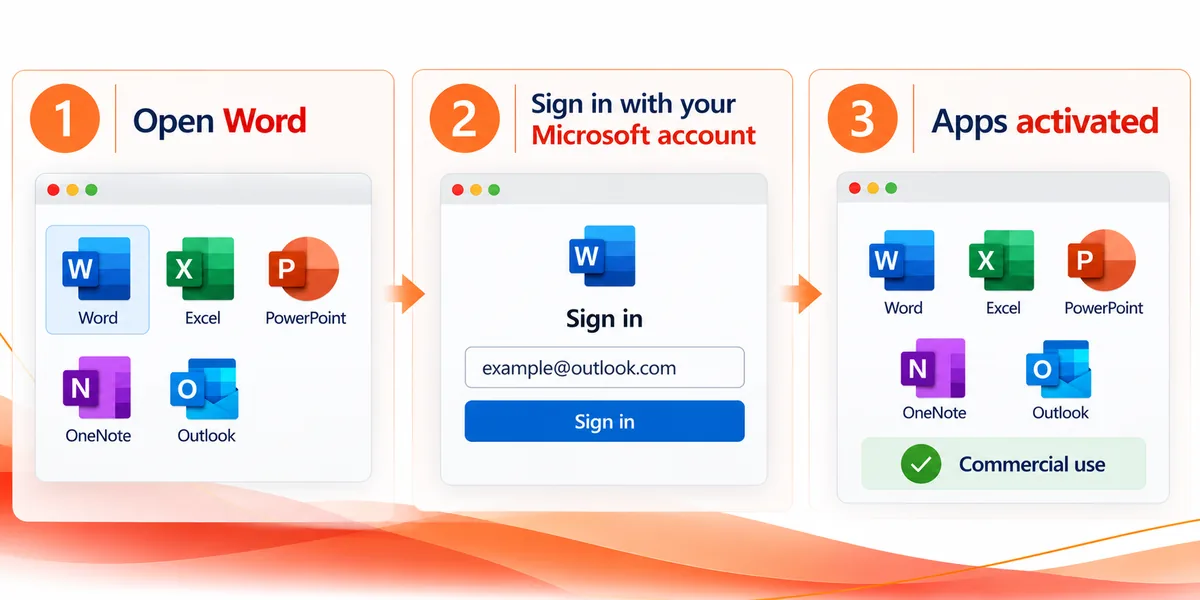
Office Home & Business 2024 uses Microsoft’s retail activation.
Microsoft says you need internet access to install and activate Office 2024. Once Office is installed, Microsoft’s steps to activate Office for Mac are:
- Open any Office app, such as Word, from your Applications folder.
- In the What’s New box, select Get Started.
- On the Sign in to activate Office screen, select Sign in.
- Enter the email address and password for the Microsoft account associated with your Office purchase. Office checks for a valid license and activates.
If you’re buying Office for one Mac, you never need to get or deploy a Volume License Serializer.
That makes Office Home & Business 2024 the more convenient choice if you look after your own computer.
Before you install, check that your Mac meets Microsoft’s requirements. Our Office 2024 for Mac system requirements guide walks you through what your Mac needs.
Is Office Home 2024 for Mac enough?
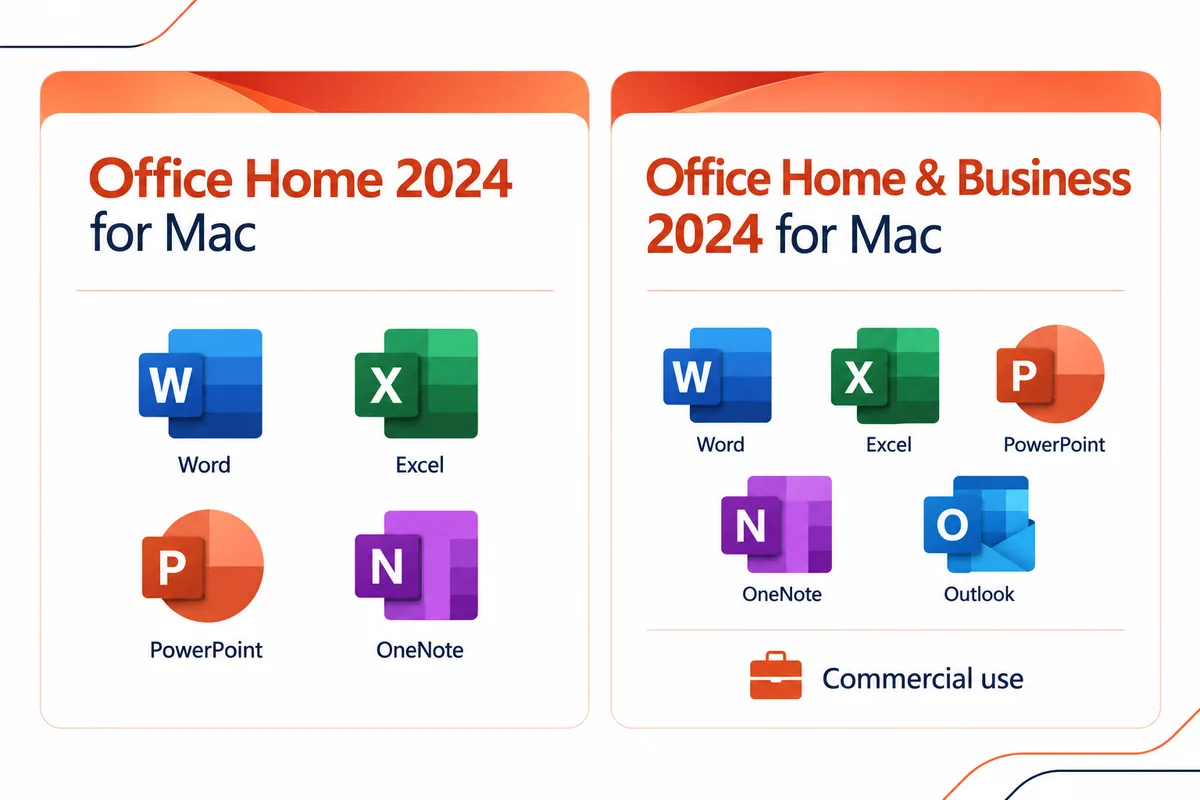
For a lot of personal users, Office Home 2024 for Mac has everything they need.
Microsoft says Office Home 2024 is for students and families who want classic Office apps for use at home or school.
Microsoft’s Office 2024 announcement lists Word, Excel, PowerPoint and OneNote. On a Mac, it’s a one-time purchase for one Mac.
The two main differences: Office Home 2024 doesn’t include Outlook, and Microsoft lists it for non-commercial use.
When should you choose Office Home 2024?
Office Home 2024 makes sense when most of what you do is writing, spreadsheets, presentations and note-taking.
For example, if you use Word for school assignments, Excel for a personal budget and PowerPoint for class presentations, you may not need Outlook or the commercial-use rights that come with Office Home & Business.
If you’re searching for Office Home and Student, this is probably the edition you’re after. Microsoft lists Office Home 2024 as the edition formerly called Home & Student.
You can explore Microsoft Office Home 2024 for Mac | 1 Mac at Solved IT Services.
When is Office Home & Business 2024 the better choice?
Choose Office Home & Business 2024 when you need Outlook or plan to use Office for work.
A freelancer preparing client documents, a consultant handling business email, or a small business owner keeping financial spreadsheets all benefit from the commercial-use rights.
Outlook matters most if you like having Microsoft’s desktop email and calendar app on your Mac.
If you use your Mac for business, Office Home & Business 2024 is usually the right retail edition.
Which Office 2024 edition is right for your Mac?
The right Microsoft Office for Mac edition comes down to how you’ll use it and how your software is licensed.
Are you buying Office for personal or school use?
Choose Office Home 2024 for Mac if you need Word, Excel, PowerPoint and OneNote for home or school and don’t need Outlook.
You get the familiar apps with a one-time retail purchase.
Are you buying Office for professional or small business use?
Choose Office Home & Business 2024 for Mac.
It adds Outlook to Word, Excel, PowerPoint and OneNote, along with the commercial-use rights you need for work.
For an individual professional or small business buying Office for a Mac, it’s our top recommendation.
Are you managing Office installations for an organization?
If your organization has a Microsoft volume licensing agreement and manages its Macs centrally, Office 2024 Standard for Mac may fit your licensing and deployment needs.
Your IT or procurement team should confirm which volume-licensed edition your agreement covers.
If you’re buying a regular retail license for one Mac, Office Home & Business 2024 is the edition to look at.
Do you need Microsoft 365 instead?
Office 2024 and Microsoft 365 are licensed in different ways.
With Office 2024, you pay once for the included classic desktop apps, with no ongoing subscription for those apps.
Microsoft 365, which some people still search for as Office 365 for Mac, is a subscription, and the services and features you get depend on the plan.
This difference matters when you search for terms like “Microsoft Office for Mac lifetime” or “Microsoft Office for Mac one time purchase.”
A one-time license doesn’t mean free upgrades to every future version. It means you buy a specific edition without recurring subscription payments for it.
If you want more detail, our Microsoft Office for Mac one-time purchase guide explains how it works.
Why buy from Solved IT Services?
At Solved IT Services, we help customers buy the right Microsoft software for their computers and their business.
Whether you need Office Home 2024 for personal use or Microsoft Office Home & Business 2024 for work, our goal is to make buying and installing it easy.
Here’s why customers choose us:
Microsoft Solutions Partner and certified reseller: We work with Microsoft software and licensing and help customers find the edition that fits their needs.
More than 12 years in business: We’ve spent more than 12 years supplying software and helping customers with licensing, installation and activation.
Many industry relationships: Our relationships across the software industry help us keep up with product availability and licensing requirements.
Fast estimated delivery: Estimated delivery within 30 minutes or less from the time of purchase.
US-based 24/7 support: Our US-based team is available around the clock for questions about your purchase or installation.
We guarantee full installation and full activation of every product we sell, or your money back. See the SIS Guarantee.
Solved IT Services offers the retail editions, Office Home & Business 2024 for Mac and Office Home 2024 for Mac. We do not sell Office 2024 Standard for Mac.
What are the most frequently asked questions about Office 2024 for Mac?
No. Both include Word, Excel, PowerPoint and Outlook, but they’re licensed and activated differently.
Office 2024 Standard for Mac is for organizations that use Microsoft volume licensing. Office Home & Business 2024 is a retail edition for individuals and small businesses, and it includes commercial-use rights.
Office 2024 Standard for Mac is available through Microsoft volume licensing agreements for organizations, not through the usual consumer retail process.
If you want a one-time Office purchase for a Mac, look at Office Home 2024 or Office Home & Business 2024.
Yes. It includes the classic Outlook desktop app along with Word, Excel, PowerPoint and OneNote.
That makes it a good fit if you want Microsoft’s email and calendar app as part of your Office suite.
Office Home 2024 doesn’t include Outlook.
Office Home & Business 2024 is a one-time purchase. You don’t need an ongoing Microsoft 365 subscription for its desktop apps.
Your purchase covers this edition. It doesn’t automatically include future major Office releases.
When you see products advertised as MS Office for Mac or Microsoft Office for Mac lifetime, check the exact edition and its licensing terms.
Yes. Microsoft includes commercial-use rights with Office Home & Business 2024.
You can use it for business work such as client documents, spreadsheets, professional email and presentations.
Office Home 2024 is for home and school use, not commercial work.
Office 2024 Standard for Mac is part of Microsoft’s volume-licensed Office LTSC family, not the Microsoft 365 subscription apps.
Its licensing follows the organization’s volume licensing agreement, and activation is handled with Microsoft’s volume licensing tools.
If you want a one-time retail purchase for your own Mac, look at Office Home & Business 2024 for Mac.
For personal and school use without Outlook, Office Home 2024 for Mac is usually enough.
For work, business documents or Outlook, Office Home & Business 2024 for Mac is the retail edition we recommend.
If your organization manages software through volume licensing, check with your IT administrator about the right organizational edition.
Ready to choose the right Microsoft Office edition for your Mac?
If you want Microsoft Office for Mac without a subscription, Solved IT Services offers one-time-purchase retail editions for personal and business use.
Pick Microsoft Office Home and Business 2024 for macOS – Digital Download | 1 Mac if you need Outlook and commercial-use rights, or choose Office Home 2024 for personal use.
Not sure which edition fits? Email support@solveditservices.com for help comparing, or request a quote for your software needs.