trustpilot (2)
ChatGPT Image Jun 29, 2026, 11 43 47 AM (1)

Unlock Your Bonus Savings 25% Off!

Use Promo Code: 25OFF2026

0
Sale!

Microsoft Access 2021

Original price was: $119.99.Current price is: $62.40.

65 people are viewing this right now
Buy It Now
  • Installation files (32 & 64bit)
  • OEM product key
  • Free tech support
  • Genuine Microsoft Software
  • One-time purchase – no subscription, 1 PC
  • Activation help from our team
Category

Access 2021: The Perfect Solution for developing full-fledged database Applications

Access 2021 is one of the Office 2021 applications that is perfectly designed to meet your database management needs and requirements. Get your copy now from our website, Solveditservices.com with help from our team.

Access 2021

Everything you need to know about the Microsoft Access 2021

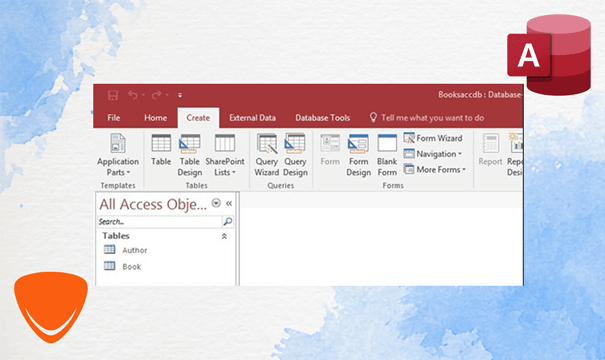
Access 2021 enables you to easily create and share your database, as well as providing information to help you better design and structure your data. Large volumes of data can be easily saved, managed, and analyzed with this powerful tool. Reports and analytics structure your data so that your apps seem consistent and readable. If you upgrade from Access 2019 to Access 2021, you will still be able to use the features you’re familiar with along with features added in Access 2021. Like other database software, Access 2021 stores your data and builds relationships between distinct data sets. Once activating Access 2021, you can easily build common object types such as tables, queries, forms, and reports.

Performance Improvements In Access 2021

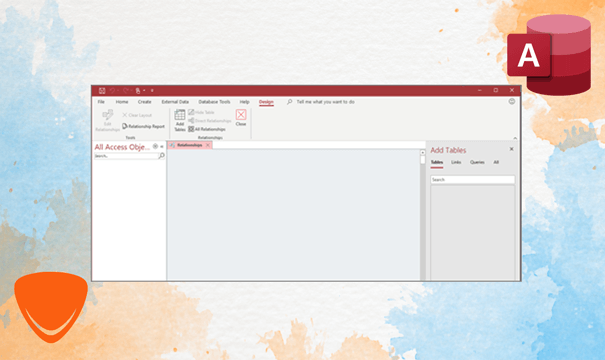
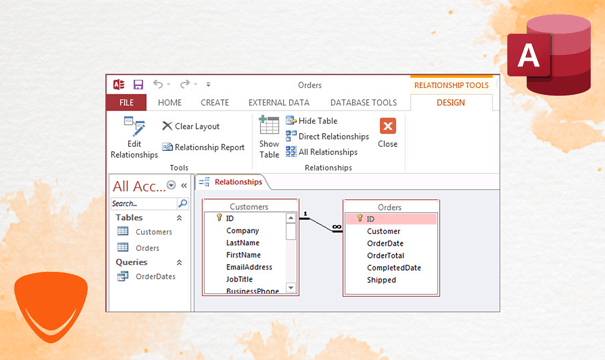
Access 2021’s updated Linked Table Manager offers a structured location for viewing and managing all data sources and linked tables in a specific database. You can manage linked tables by updating, unlinking, searching, changing, or removing them. In Access, you can use the DateTime2 data type to improve the accuracy and details of records that include dates and times. Other enhancements have been made to the Query Designer and the Relationships window.
Performance Improvements In Access 2021

Database Management

For adding tables to relationships and queries, Access 2021 displays the Add Tables task pane, which remains active while you work. The active tab is plainly visible, tabs can be readily restored by dragging them back, and database objects can be discarded with a single click.
Database Management

Visual Enhancements In Access 2021

Microsoft is continually changing and improving its applications to make it more effective and flexible. Among these changes, there are Theme background changes including Dark grey and black theme, which are designed for people who prefer a softer touch on high-contrast visuals. In addition, you can also input a Hex color value in the Hex box to get the color you need.
Visual Enhancements In Access 2021

Reviews

There are no reviews yet.

Be the first to review “Microsoft Access 2021”

Your email address will not be published. Required fields are marked *

Frequently asked questions

How will I receive my software, and how long does it take?

Digital products are delivered by email to the address used at checkout. You’ll receive your license details plus download and installation instructions. No disc or USB is shipped for digital products. Digital delivery by email. Estimated delivery within 30 minutes or less from the time of purchase. Physical media products ship to your address; shipping methods and timeframes are in our Shipping & Returns policy. See our Delivery & Activation page for details.

I haven’t received my license email. What should I do?

Contact our support team and we’ll fix it. Email support@solveditservices.com or call (447) 223-5297 with your order number. You can also check your spam, junk and promotions folders, search your inbox for your order number or “Solved IT Services”, and look up the order in My Account.

If we can’t resolve it, our refund policy applies.

My software won’t activate online. What can I do?

Contact our support team and we’ll fix it. Email support@solveditservices.com or call (447) 223-5297, and include your order number and a screenshot of the error (cover most of the key). Don’t keep retrying the same key. While you wait, check that you’re connected to the internet and your computer’s date and time are correct. If the key still does not activate, we will help with activation.

If we can’t resolve it, our refund policy applies.

What is your refund policy?

Contact our support team and we’ll fix it. If something isn’t working, email support@solveditservices.com or call (447) 223-5297, and include your order number and a screenshot of any error.

If we can’t resolve it, our refund policy applies. Refunds are processed promptly; banks typically post them within 5–10 business days. To be eligible, products must be new and unused, not misused or tampered with. Full details, including time limits, are in the policy.

Will this work on my Mac?

Check before you buy. Make sure the product title and description say Mac. Windows and Mac versions can be separate listings, so a product for Windows (PC) may not install on a Mac. Microsoft also states that some apps are PC only, including Access, Project and Visio. If you’re not sure which product fits your computer, email support@solveditservices.com before ordering and tell us your Mac’s macOS version.

Already ordered the wrong version, or a Windows product for your Mac? Contact our support team and we’ll fix it. Email support@solveditservices.com or call (447) 223-5297 with your order number and a screenshot of any error. If we can’t resolve it, our refund policy applies.

Related products

Original price was: $249.99.Current price is: $107.99.

Original price was: $195.00.Current price is: $74.99.

Original price was: $149.99.Current price is: $69.99.

×

Please fix the following errors:

Scroll to Top
0

Your Cart is Empty