


Adobe Acrobat Pro 2020 for Windows (non-subscription)
*This product will not work on macOS.
What’s New in Adobe Acrobat 2020
New Home View
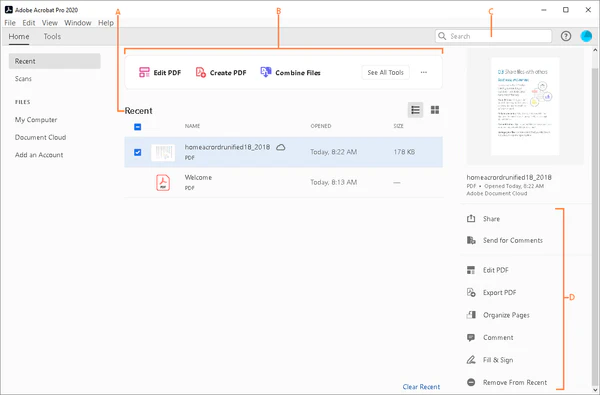
The new Home view helps you stay organized and productive – it’s a single place for you to organize, manage, and search for all your PDFs.
- Recent Files list: Displays your recent files opened for viewing from your computer, Document Cloud storage, or third-party storage like OneDrive, Dropbox, Box, and SharePoint.
- Recommended tools: Helps you discover top Acrobat tools like Edit PDF, Create PDF, Combine PDFs, and more.
- Search box: Lets you search all your Document Cloud files and the files sent or received for viewing, reviewing, or signing.
- Context pane: Helps you take actions on files across all Home view with context-sensitive menus, and check the status of participants and history of activities for shared documents.

A. Recent files B. Recommended tools C. Search files D. Context pane
View MIP-protected PDFs in Acrobat 2020 and Reader 2020
Acrobat Pro and Standard
Now you can use Adobe Acrobat 2020 and Acrobat Reader 2020 Windows and Mac desktop applications to open files protected with MIP (Microsoft Information Protection) solutions including Azure Information Protection (AIP) and Information Protection using Office 365.
Acrobat 2020 and Acrobat Reader 2020 auto-detect a MIP-protected file and prompts you to download the corresponding plug-in from the plug-in download page. Once you download and install the plug-in, the protected files open like any other PDF in Acrobat or Reader.
Color customization capability in the Fill & Sign tool
Acrobat Pro and Standard
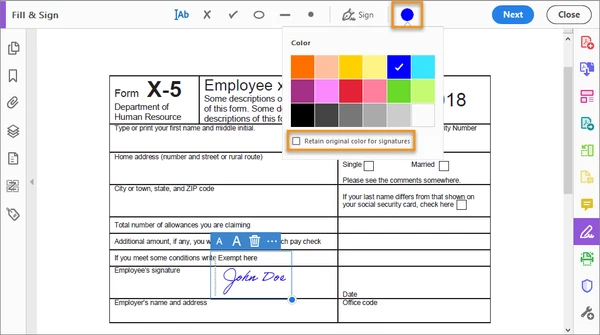
You can now choose your desired color to fill out the PDF form and sign it using the Fill and Sign tool in Acrobat 2020. To change the color, click the Color button in the Fill & Sign toolbar.

By default, the signature’s color is black. To retain the default color, deselect the Retain Original Color For Signatures checkbox.
For more information, see Fill out your PDF form.
Run OCR on scanned documents with live text
Acrobat Pro and Standard
With Acrobat 2020, you can run OCR on a scanned PDF that contains images with live text on them.
- Open the scanned PDF in Acrobat 2020.
- Go to Tools > Enhance Scan > Recognizable Text > In This File.
- Click Settings in the toolbar. The Recognize Text dialog box is displayed.
- In the Output drop-down list, choose Searchable Image or Searchable Image (Exact) and click OK.
- Click Recognize Text in the toolbar.
Preflight enhancements and PDF/UA validation in preflight
Acrobat Pro only feature
- Preflight Libraries: Preflight Profiles, Fixups, and Checks are now well organized in Libraries.
For more information, see Preflight Libraries (PDF | 711 KB). - Preflight Variables: Variables allow you to dynamically adjust Profiles, Checks, and Fixups when they are applied. Variables can be used when editing Profiles, Checks, or Fixups wherever the orange triangle shows up. It is also possible to filter for existing objects using Variables.
- Preflight supports the new Ghent PDF Workgroup Specification 2015: The new GWG specifications are based on PDF/X-4, and support native transparency as well as media neutral RGB workflows.
- PDF/UA validation in Preflight: Preflight now makes it possible to fix common accessibility problems and to validate against the international standard for Universal Accessibility PDF/UA.
Improved Accessibility feature updates and workflows
Acrobat Pro only feature
Improved Accessibility features in Acrobat 2020 make it easier for people with disabilities to use PDF documents and forms, with and without the aid of assistive technology software and devices.
Reviews
There are no reviews yet.