


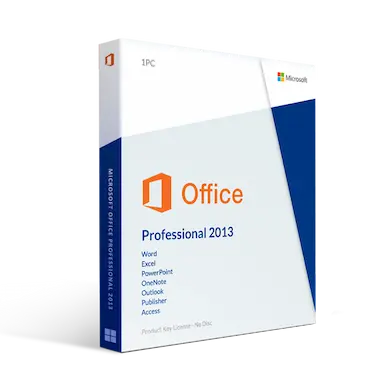
Microsoft Office 2013 Professional Plus (2 Pc Installs)
$199.99 Original price was: $199.99.$74.99Current price is: $74.99.
Microsoft Office 2013 Professional Plus (2 Pc Installs)
Introduction: The reputed business tool of the era
There was a time when accomplishing basic goals and tasks in a computing environment was a challenge. However, with the dawn of technology and the advent of newer computing resources, things seem to have simplified for the average user. Every few months, some new advancement in the technological world seems to overtake the throng of people who are associated with the industry and bring something new for them. With the launch of Microsoft Office 2013 Professional Plus, users can now work in an enhanced manner on all their office chores quite easily.
Microsoft Office 2013 Professional Plus has allowed users to explore many ways in which they can synchronise their workload and achieve maximum efficiency and value for their work. With the level of features and utility that can be seen in this version of the Windows, it is easy to conclude that a lot of thought has gone into its creation.
Not the right Office 2013 product you were looking for? Check out our selection of additional Microsoft Office 2013 software today.
Features
Microsoft Word
Simple and Powerful Documents
- Word 2013 is bundled with better design tools and templates that help you create appealing documents.
- Do more in word, pop in an online video, edit PDF document content, align images and diagrams with a minimal fuss.
- The new Read Mode offers a clean and distraction-free. Also, it works well on tablets.
Visualize your Work
- Use the Read Mode to visualize how your document will look like before you print.
Look closer into your Work
- Double-tap/click to zoom in your images or charts to fill the screen. Focus on and take in the required information.
- Collapse or expand parts of your document by just a click.
- Add summaries in headings and allow the readers to open section and read details if they want.
Work together.
- A new Simple Markup and revision view provides an uncomplicated view of your work.
- Use the comment reply button flag off a comment that is no longer relevant.
Access
- Connect, access, manage and analyze data stored in a different location using Access 2013.
- Import data from different sources, including Excel, ODBC, SharePoint, and text files.
- Quickly add tables to your application using pre-designed table templates.
- Access 2013 automatically create views for each table that display data from related tables.
- Access apps save you the trouble of building switchboards, views, and other UI elements.
- Use SharePoint server as a host and build browser-based and polished database apps.
Microsoft Excel
- This innovative program comes loaded with different useful tools, which makes data analysis easier.
- The Flash Fill tool save time by learning your data entry patterns and autocomplete the task.
- Chart selection is simplified by only showing charts that are relevant to the data chosen.
- Creating PivotTables takes a few clicks; thanks to the Recommended PivotTables features.
- Share and collaborate with your colleagues via SkyDrive.
OneNote
- Organize your notes into notebooks, pages, and sections using OneNote.
- Include handwritten, video, and images into your notebook using OneNote.
Microsoft Outlook
- Outlook 2013 is designed with a makeover to help you focus and switch between elements quickly.
- Take control and save time with the Conversation view. The feature lets you categorize, condense, and ignore length email exchanges by a click.
- Inline replies are now possible, with just a click.
- Preview and take actions on message right from inside the list.
- You can view Tasks and Appointments without needing to open separate windows.
- Never forget to attach a file; thanks to the nifty attachment reminder.
Microsoft PowerPoint
- Share your presentation through a web browser to a remote audience even if they don’t’ have PowerPoint.
- The Presenter view lets you see note on your monitor while the audience only sees the slides.
- Use the Zoom feature on a slide to magnify charts, diagrams, or anything to provide emphasis to your audience.
- Use slide Navigator to browse others through other slides in the presentation.
- Template themes come with variations, which make it simple to hone in on the look that you want.
Microsoft Publisher
- Use inbuilt effects for both text and images to add flare to your design. You can apply the following; 3-D rotations, bevels, reflections, glow, and shadows into your document.
- From the scratch area, you can Drag and drop pictures onto the publication page. Or swap images for others if you don’t like the current layout.
- Use the Search feature to locate pictures; whether they’re located on the Web or local machine.
- Save your publications for photo printing using the Photo Center Printing feature.
- Create captivating and impressive designs using different templates available in Publisher 2013.
System requirements
- • Processor: 1 Ghz or faster x86 or x64 bit processor with SSE2
- • Operating system: Windows 7 or later, Windows server 2008 R2, or Windows server 2012
- • Memory: 1 GB RAM (32 bit); 2 GB RAM (64 bit)
- • Hard disk space: 3.0 GB available disk space
- • Required display: 1024×576 resolution
- • Graphics: DirectX 10 graphics card
- • Required unit: A touch enabled device is required to use any multi touch functionality. Touch features are optimized for Windows 8 or later
Frequently asked questions
How will I receive my software, and how long does it take?
Digital products are delivered by email to the address used at checkout. You’ll receive your license details plus download and installation instructions. No disc or USB is shipped for digital products. Digital delivery by email. Estimated delivery within 30 minutes or less from the time of purchase. Physical media products ship to your address; shipping methods and timeframes are in our Shipping & Returns policy. See our Delivery & Activation page for details.
I haven’t received my license email. What should I do?
Contact our support team and we’ll fix it. Email support@solveditservices.com or call (447) 223-5297 with your order number. You can also check your spam, junk and promotions folders, search your inbox for your order number or “Solved IT Services”, and look up the order in My Account.
If we can’t resolve it, our refund policy applies.
My software won’t activate online. What can I do?
Contact our support team and we’ll fix it. Email support@solveditservices.com or call (447) 223-5297, and include your order number and a screenshot of the error (cover most of the key). Don’t keep retrying the same key. While you wait, check that you’re connected to the internet and your computer’s date and time are correct. If the key still does not activate, we will help with activation.
If we can’t resolve it, our refund policy applies.
What is your refund policy?
Contact our support team and we’ll fix it. If something isn’t working, email support@solveditservices.com or call (447) 223-5297, and include your order number and a screenshot of any error.
If we can’t resolve it, our refund policy applies. Refunds are processed promptly; banks typically post them within 5–10 business days. To be eligible, products must be new and unused, not misused or tampered with. Full details, including time limits, are in the policy.
Will this work on my Mac?
Check before you buy. Make sure the product title and description say Mac. Windows and Mac versions can be separate listings, so a product for Windows (PC) may not install on a Mac. Microsoft also states that some apps are PC only, including Access, Project and Visio. If you’re not sure which product fits your computer, email support@solveditservices.com before ordering and tell us your Mac’s macOS version.
Already ordered the wrong version, or a Windows product for your Mac? Contact our support team and we’ll fix it. Email support@solveditservices.com or call (447) 223-5297 with your order number and a screenshot of any error. If we can’t resolve it, our refund policy applies.
Related products
$249.99 Original price was: $249.99.$77.49Current price is: $77.49.
$199.99 Original price was: $199.99.$92.99Current price is: $92.99.
$299.99 Original price was: $299.99.$88.99Current price is: $88.99.
Reviews
There are no reviews yet.